Purchase & Recharge Guide
Poodle Morph Pro securely processes payments directly within Rhino 3D.
⚠️ Important Notice
You can ONLY recharge when your remaining credits (Preview/Bake) are exactly 0.
If you still have uses left, the system will block further purchases. Please consume your current balance first.
1 Open the Registration System
In Rhino 3D, click the Registration UI Icon on the Poodle Morph toolbar to open the registration window.
2 Initial Registration (First-time users)
If this is your first time, stay on the [1. Registration] tab. Fill in your Hardware ID (HWID), Company Name, Email, etc., and click Submit Registration.
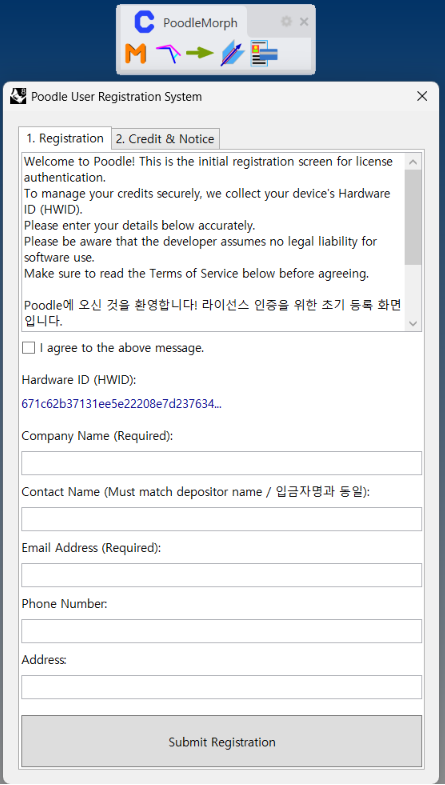
3 Choose Payment Method
Go to the [2. Credit & Notice] tab, agree to the Terms of Service, and select your preferred payment method:
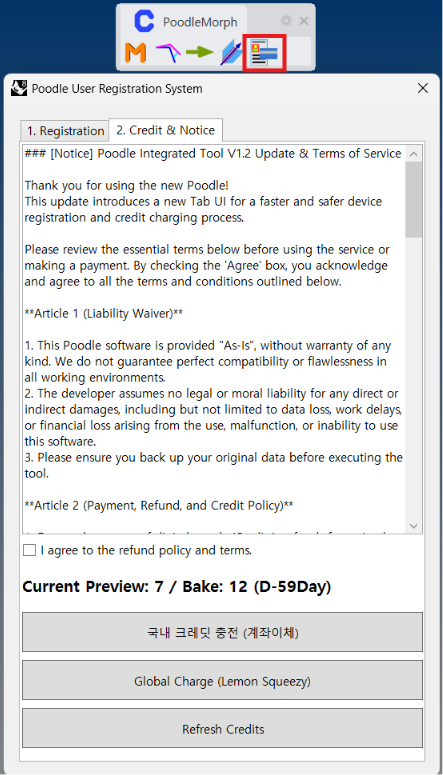
- 국내 크레딧 충전 (계좌이체): For users in South Korea. Direct bank transfer (Cash receipt and tax invoice available).
- Global Charge (Lemon Squeezy): For international users. Secure payment via Lemon Squeezy (Credit Card, PayPal, etc.).
4 Refresh Credits
After completing the payment, click the Refresh Credits button to instantly update your balance.